

Become a DevOps Engineer📈 – Now at 15% OFF!
Why Choose This DevOps Course?
Hands-On Training with Real-World Projects
Learn by doing! Work on live projects in CI/CD pipelines, automation, cloud deployments, and containerization. No boring theory—just practical DevOps skills you can apply on the job from day one.
Learn from Industry Experts
Our trainers are experienced DevOps engineers who have worked with top IT companies. Get insider knowledge, mentorship, and career tips to master the real-world challenges of DevOps.
Job-Ready Curriculum Aligned with Industry Demand
This course prepares you for high-demand roles like DevOps Engineer, Release Manager, and Cloud Engineer. Master top tools such as Git, Jenkins, Docker, Kubernetes, Terraform, Ansible, and AWS.
Accelerate Your Career with In-Demand Tools
Upgrade your resume with cutting-edge DevOps skills in automation, CI/CD, cloud, and monitoring. Showcase hands-on expertise that makes you stand out in technical interviews.
Globally Recognized Certificate of Completion
Earn a professional DevOps certification after completing the course. Highlight your achievement on LinkedIn, in job applications, or when seeking career growth in your current role.
What & How You'll Learn
- CI/CD Pipeline Mastery – Learn how to build, automate, and manage Continuous Integration and Continuous Deployment pipelines using tools like Jenkins, GitHub Actions, CodePipeline, etc.
- Infrastructure as Code (IAC) – Understand how to provision and manage infrastructure using tools like Terraform, AWS CloudFormation, and Ansible.
- Containerization & Orchestration – Gain hands-on skills in Docker for containerization and Kubernetes for orchestrating and scaling applications.
- Monitoring & Logging – Learn to implement monitoring, alerting, and centralized logging using tools like Prometheus, Grafana, ELK Stack, and CloudWatch.
- Collaboration & Automation Culture – Embrace DevOps principles to break silos, foster collaboration between development and operations teams, and automate repetitive tasks for faster, more reliable deployments.
- Cloud Platforms & Deployment – Gain expertise in deploying and managing applications on leading cloud platforms like AWS, Azure, and Google Cloud. Learn cloud-native DevOps practices to build scalable, secure, and resilient systems.
Learning Objectives
- DEVOPS
Course content
- 10 tools
- 28 Sessions
- 1 Months Duration
Fundamentals of DevOps and Its Lifecycle
What is DevOps
DevOps is a culture and practice that combines software development (Dev) and IT operations (Ops) to deliver software faster, more reliably, and with continuous improvement.Why DevOps
It reduces development time, improves collaboration between teams, automates processes, and ensures faster delivery of high-quality software.Evolution of Software Development
Software practices evolved from slow, manual processes to faster, automated, and collaborative approaches for quicker releases.Traditional Waterfall Model
A step-by-step process where each phase (design, development, testing, deployment) happens in sequence. It is rigid and slow to adapt to changes.Agile Methodology
Focuses on flexibility, collaboration, and iterative development—software is built and improved in small, quick cycles.DevOps Lifecycle
Covers the entire process: planning, coding, building, testing, releasing, deploying, operating, and monitoring—with continuous feedback at every stage.
Git Basics and Workflow
What is a Git Repository
A Git repository is a storage space where all your project files and version history are saved. It can be local (on your computer) or remote (like GitHub).Git Workflow
The process of working with Git—clone a repo, make changes, stage files, commit, and push updates to share with others.Git Configuration
Setting up Git with your name, email, and preferences so that commits are properly tracked.Git Branching
Create separate branches to work on new features or fixes without affecting the main project.Git Overview
Git is a version control system that tracks changes in code, supports teamwork, and helps manage projects efficiently.Git Commit
A commit saves your changes in the repository with a message, creating a checkpoint you can return to later.
Maven Basics and Lifecycle
Build Tool
A build tool automates tasks like compiling code, packaging files, running tests, and deploying applications.POM (Project Object Model)
A POM file in Maven defines the project’s configuration—dependencies, plugins, and build settings.Maven Lifecycle
Maven follows a structured lifecycle with phases like validate, compile, test, package, install, and deploy to manage project builds efficiently.
Jenkins & CI/CD Basics
Continuous Integration (CI)
A practice where code changes are automatically built, tested, and integrated frequently to detect issues early.What is Jenkins
Jenkins is an open-source automation tool that helps in building, testing, and deploying applications using CI/CD.Jenkins Installation
Install Jenkins on your system or server to start automating builds and deployments.Configuration of Jenkins
Set up Jenkins with users, security, plugins, and project-specific settings for smooth operation.Jenkins Pipeline
A pipeline automates the software lifecycle (build, test, deploy) using code scripts for continuous delivery.Job
A Jenkins job defines a specific task like building a project, running tests, or deploying applications.Plugins
Extend Jenkins functionality with plugins for tools like Git, Docker, Maven, or Slack.Two-Server Deployment
Use Jenkins to deploy applications across multiple servers for scalability and reliability.Deployment
Automate application delivery to servers or cloud environments with Jenkins.Tomcat
Integrate Jenkins with Apache Tomcat to deploy Java-based web applications directly.CI/CD Pipeline
A complete process that combines Continuous Integration (CI) and Continuous Deployment (CD) for faster releases.Groovy Script
Use Groovy in Jenkins pipelines to customize and automate advanced workflows.
Docker Basics and Workflow
What is Docker?
- Docker is a containerization tool
- Runs apps with dependencies in lightweight containers
- Ensures apps work the same everywhere
Development / Deployment
- Development: build and test inside containers to avoid environment issues
- Deployment: move the same container to servers or the cloud for consistent performance
VM vs Docker
- VM: needs full OS, heavy, slow
- Docker: shares host OS, lightweight, fast, uses fewer resources
Docker Engine
- Core service that powers Docker
- Includes: Docker Daemon (background), REST API (communication), CLI (commands)
Docker Daemon
- Background process
- Builds and runs containers
- Manages images, volumes, and networks
Create Images
- Image = blueprint of a container
- Built using Dockerfile (setup instructions)
- Command: docker build -t myapp.
Create Container
- Container = running instance of an image
- Lightweight, isolated, portable
- Command: docker run -d -p 8080:80 myapp
Docker Workflow
- Write Dockerfile
- Build Image (docker build)
- Run Container (docker run)
- Test locally
- Deploy on server/cloud
- Share via Docker Hub/Registry
Kubernetes
Introduction
- Kubernetes (K8s) is a container orchestration platform.
- It helps manage, scale, and deploy containerized applications automatically.
Container Management
- Handles multiple containers across different machines.
- Ensures apps run reliably with features like auto-healing, scaling, and load balancing.
Kubernetes Workflow
- The developer writes code and packages it in a Docker container.
- The container image is pushed to a registry.
- Kubernetes pulls the image and deploys it on worker nodes.
- K8s manages scaling, health checks, and networking automatically.
Kubernetes Configuration
- Apps are defined using YAML/JSON files.
- Configuration specifies containers, resources (CPU, memory), networking, and scaling rules.
- Example: Deployment files, Service files, ConfigMaps, Secrets.
Pods
- The smallest deployable unit in Kubernetes.
- A Pod can run one or multiple containers that share storage and network.
Containers
- Containers run the actual application inside Pods.
- They are lightweight, portable, and isolated environments.
Orchestration
- Orchestration = automated management of containers.
- Kubernetes orchestrates:
- Deployment (launching containers)
- Scaling (adding/removing containers)
- Networking (service discovery, load balancing)
- Healing (restart failed containers automatically)
Core Concepts of Terraform
Terraform
- Terraform is an Infrastructure as Code (IaC) tool.
- It helps automate the creation, management, and updating of cloud infrastructure.
Configuration
- Infrastructure setup is defined in configuration files.
- Written in HCL (HashiCorp Configuration Language).
- Describes what resources should exist (not how to create them).
Files
- Main configuration is usually in main.tf.
- Other files:
- Variables.tf → define input values
- outputs.tf → define outputs after deployment
- terraform.tfstate → stores current infrastructure state
Providers
- Providers connect Terraform to cloud platforms or services.
- Examples: AWS, Azure, GCP, Kubernetes.
- Each provider manages specific resource types.
Resources
- Resources are the actual infrastructure elements.
- Examples: VM instances, networks, storage, and databases.
- Defined in configuration files with desired settings.
Variables
- Used to make Terraform code flexible and reusable.
- Can define defaults or pass values during runtime.
- Example: region, instance type, or project name.
Ansible Basics and Components
Introduction
- Ansible is an open-source automation tool.
- Used for configuration management, application deployment, and IT orchestration.
- Agentless → only needs SSH to connect to systems.
Configuration
- Ansible configurations are written in YAML files.
- Define how servers, apps, and environments should be set up.
Ansible
- Core tool that handles automation tasks.
- Executes instructions from playbooks on target systems.
Playbooks
- Playbooks are YAML files with automation tasks.
- Define what actions to run on which hosts.
- Example: installing software, updating configs.
Inventory
- A file that lists hosts/servers where Ansible will run.
- Can be static (list of IPs/hostnames) or dynamic (cloud-based).
Ansible Modules
- Pre-built units of work in Ansible.
- Each module performs a specific task (e.g., install a package, copy a file).
- Example: yum, apt, copy, service.
Ansible Roles
- Help organize playbooks into reusable components.
- Each role has tasks, variables, templates, and files.
- Makes large projects easier to manage.
Command Line Interface (CLI)
- Ansible commands are executed through the CLI.
- Examples:
- ansible all -m ping → test connection to all hosts
- ansible-playbook site.yml → run a playbook
Core Concepts of Splunk
Splunk Indexer
- The indexer stores and organizes incoming machine data.
- It converts raw data into searchable events.
- Supports fast search, filtering, and reporting.
Splunk Search Head
- The search head is the web interface where users run searches.
- It distributes search requests to indexers and displays results.
- Provides dashboards, reports, and visualizations.
Splunk
- Splunk is a data analytics and monitoring platform.
- Collects, indexes, and analyzes machine-generated data (logs, metrics, events).
- Helps in troubleshooting, security monitoring, and business insights.
Forwarding and Receiving
- Forwarders collect data from source machines and send it to indexers.
- Receiving happens at the indexer end, where the data is ingested.
- Ensures real-time, reliable data transfer from multiple sources.
Prometheus
Prometheus Server
- The core component of Prometheus.
- Collects, stores, and processes monitoring data.
- Scrapes metrics from configured targets at regular intervals.
Prometheus Time-Series
- Prometheus stores data as a time series (values changing over time).
- Each time series has:
- A metric name (e.g., http_requests_total)
- Labels (key-value pairs for filtering, e.g., method="GET")
- A timestamp with the value.
- This allows detailed monitoring and analysis of system performance.
Prometheus
- Prometheus is an open-source monitoring and alerting system.
- Designed for reliability and scalability.
- Works well for cloud-native and containerized environments.
- Supports alerting through Alertmanager and visualizations via Grafana.
Grafana
Grafana
- Grafana is an open-source visualization and monitoring tool.
- Used to analyze and display metrics from various data sources.
- Popular for real-time dashboards and system monitoring.
Dashboard
- A dashboard is a collection of visual panels.
- Displays metrics in graphs, charts, and tables.
- Helps teams track system health, performance, and trends at a glance.
Data Sources
- Grafana connects to different data sources like Prometheus, InfluxDB, Elasticsearch, MySQL, and more.
- Data sources provide the metrics that Grafana visualizes.
- Multiple sources can be combined in one dashboard.
Alerts
- Alerts notify users when certain conditions are met (e.g., CPU usage > 80%).
- Can be sent via email, Slack, PagerDuty, etc.
- Ensures quick response to critical system issues.
Why This Course is a Game-Changer 🚀
Become a skilled DevOps Engineer with hands-on expertise in modern DevOps tools and practices. This program provides in-depth knowledge of industry-standard DevOps methodologies and takes you from beginner to advanced level. Learn to build robust, automated, and scalable CI/CD pipelines, manage infrastructure as code, and streamline development and operations workflows. Take your skills to the next level and become proficient in deploying, monitoring, and maintaining applications efficiently.
Industry Approved Certificate
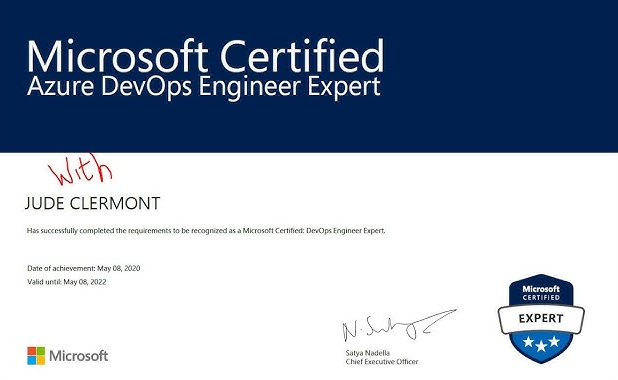
Devops Certification
Via Microsoft
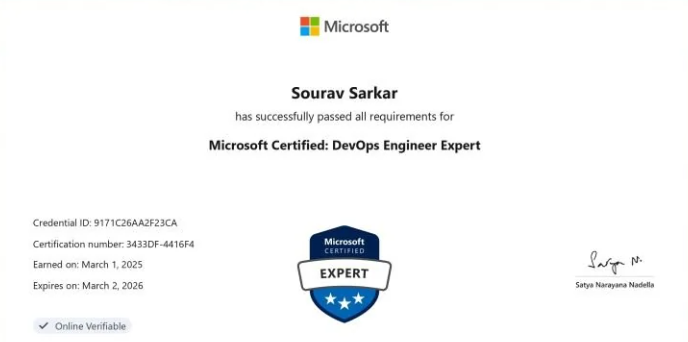
DevOps Certification
Via Microsoft
EXCELLENTTrustindex verifies that the original source of the review is Google. I am completed with python with data analytics course in IIE It's for good teaching best experience for placement training so I will like for Indra institute of education in Gandhipuram branch.Posted onTrustindex verifies that the original source of the review is Google. I have completed the data analytics course . The mentor was friendly to approach and they taught us all the concepts well and it was useful.Posted onTrustindex verifies that the original source of the review is Google. GoodPosted onTrustindex verifies that the original source of the review is Google. great place to study ccna ..sindhu mam really helped me a lot to finish my ccna coursePosted onTrustindex verifies that the original source of the review is Google. Successfully completed in networking and cloud course.thanks to iie teamsPosted onTrustindex verifies that the original source of the review is Google. Best institute in coimbatorePosted onTrustindex verifies that the original source of the review is Google. Best training institute in coimbatorePosted onTrustindex verifies that the original source of the review is Google. Best place to learn Data science and Machine Learning..Thanks IIE teamPosted onTrustindex verifies that the original source of the review is Google. Best place to learn data science in Coimbatore..Thanks IIE teamPosted onTrustindex verifies that the original source of the review is Google. I'm the student of indra institution in coimbatore. Here, to gave a well traning and good teaching of all students. Now , I'm placement to company. Thank you all
Get 15% OFF On This Course Now!

Frequently Asked Questions
Got Questions? We've Got Answers!
Can a fresher become a DevOps engineer?
Yes, a fresher can become a DevOps engineer.
With the right training in Linux, cloud, coding basics, automation, and CI/CD tools, freshers can start their career in DevOps and grow through hands-on projects and practical experience.
Who is eligible for DevOps?
Anyone with experience in IT support, software development, system administration, or networking can pursue DevOps.
It is also suitable for fresh graduates who have basic knowledge of Linux, programming fundamentals, cloud concepts, or databases. In short, DevOps is open to beginners and professionals aiming to build or advance their careers in automation, cloud, and CI/CD practices.
Do DevOps need Python?
Yes, Python is highly valuable for DevOps.
It’s widely used for automation, scripting, building CI/CD pipelines, managing cloud infrastructure, and integrating tools, making it one of the most preferred languages for DevOps engineers.
Is SQL needed for DevOps?
SQL is helpful but not essential for DevOps.
It’s mainly used for database management, monitoring, and troubleshooting, while core DevOps focuses on CI/CD, automation, cloud, and infrastructure.
Lets find your Perfect online courses today!
Empower Yourself with Expert-Lead Learning Anytime, Anywhere


