

DATA SCIENTIST MASTER PROGRAMME
Become a Data Science Expert – Save 15% Today!
Why Choose This Data Science Course?
🔹 Hands-On Training with Real-World Projects
Learn by doing! Work on live datasets, AI models, and case studies to understand how data science solves real-world problems—no boring theory—just practical, results-driven learning.
🔹 Learn from Industry Experts
Get trained by seasoned data scientists and AI professionals with years of experience in analytics, ML, and AI tools. Gain real-time insights, mentorship, and strategies from experts who work on cutting-edge projects.
🔹 Job-Ready Curriculum Aligned with Market Demand
Master the most in-demand tools and techniques—Python, R, SQL, Machine Learning, AI, Power BI, Tableau, and more. Our course is tailored to help you land your first data science role or transition smoothly into the field.
🔹 Accelerate Your Career with High-Demand Skills
Boost your portfolio with skills in predictive modeling, deep learning, data visualization, and business analytics. Impress recruiters with hands-on projects that showcase your problem-solving ability.
🔹 Globally Recognized Certificate of Completion
Earn an industry-recognized certificate to showcase your expertise on LinkedIn, resumes, and job applications. Perfect for career growth, promotions, or moving into high-paying data science roles.
What & How you'll learn?
- Build a strong foundation in Python programming, including variables, data structures, file handling, OOPs, and modules—essential for data-driven applications.
- Clean, preprocess, and manipulate complex datasets using Pandas and NumPy for real-world data analysis and business intelligence solutions.
- Train and deploy models using Linear Regression, Random Forest, SVM, Decision Trees, and KNN. Learn model evaluation, tuning, and performance optimization.
- Create visually compelling dashboards and analytical reports using Tableau and Power BI, turning raw data into strategic business insights.
- Extract, transform, and analyze data using SQL queries, Excel functions, Pivot Tables, and VBA automation—key skills for any data science job role.
- Work on real-world projects and case studies to build hands-on experience and a job-ready portfolio.
Learning Objectives
- PYTHON
- PYTHON LIBRARIES
- DATA SCIENCE
- MACHINE LEARNING
- ADVANCED EXCEL
- SQL
- POWER BI
- TABLEAU
Course content
- 7 Modules
- 90 Sessions
- 5 Months Duration
Python Basics: Why, Who, Setup & Key Concepts
Why Learn Python:
Python is simple, powerful, and highly in demand. It is used in data science, AI, web development, and automation—making it a versatile career skill.
Who Uses Python:
Top companies like Google, Netflix, and NASA rely on Python. It is used across industries such as IT, healthcare, finance, and e-commerce.
Installation & Setup:
Download Python from the official website, install it, set up path variables, and check the installation through the command prompt or terminal.
Python Features:
Easy to learn, free and open-source, supports dynamic typing, and runs on all major platforms (Windows, Mac, Linux).
Variables in Python:
Variables are containers for storing data like numbers, text, or lists. Python allows dynamic binding—meaning variable types can change easily.
Input/Output & Import:
Use input() to take user input, print() to show output, and import to use libraries such as math, pandas, or numpy.
Python Data Types & Collections Overview
Numeric Types: int, float, complex
Used for numbers.intstores whole numbers,floatstores decimals, andcomplexhandles numbers with real and imaginary parts.Text & Boolean Types: string, boolean
stringstores text like names or sentences.booleanstores only two values:TrueorFalse.Collections: tuple, list, dictionary, set, arrays
Tuple: Ordered, fixed collection (cannot be changed).
List: Ordered, changeable collection (can add/remove items).
Dictionary: Stores data in key–value pairs.
Set: Unordered collection with unique items.
Array: Stores multiple values of the same type (like numbers).
Python Essentials: Text, Math & Files
String Manipulation Techniques
Python lets you work with text using functions like slicing, joining, splitting, replacing, and formatting strings.Working with Dates, Time, and Math
Use built-in libraries likedatetimeandmathto handle dates, time calculations, and mathematical operations.Generating Random Data & Statistical Analysis
Therandomandstatisticsmodules help create random numbers, shuffle data, and perform basic statistical analysis.Reading and Writing CSV & PDF Files
Python can read and write CSV files using thecsvorpandaslibrary, and handle PDF files using libraries likePyPDF2orreportlab.
Working with Tuples in Python
Immutable Data Storage
Tuples in Python cannot be changed after creation. Once defined, their elements stay fixed, making them safe for storing constant data.Indexing
Tuple items can be accessed using index numbers (like lists). Index starts from0.Nesting
Tuples can hold other tuples or collections inside them, allowing complex data structures.Tuple Functions
Built-in functions likelen(),count(), andindex()help to work with tuples easily.
List Basics in Python
Creating Lists
Lists are created using square brackets[]and can store multiple values like numbers, text, or mixed data.Slicing
You can access parts of a list using slicing (list[start:end]) to get a range of items.Appending
Theappend()method adds a new item to the end of a list.Extending
Theextend()method adds multiple items from another list or collection to the existing list.Sorting
Lists can be sorted in ascending or descending order using thesort()method.List Comprehensions
A short way to create new lists using a single line of code, often with conditions.
Set Basics in Python
Set Theory
Sets in Python are collections of unique items. They are unordered and do not allow duplicates.Operations (Union, Intersection)
Union (
|orunion()) → Combines elements from two sets.Intersection (
&orintersection()) → Finds common elements between sets.Uniqueness Handling
Sets automatically remove duplicate values, making them useful for filtering unique data.Set Functions
Built-in functions likeadd(),remove(),len(), andclear()help manage set elements easily.
FLOW CONTROLS
Conditionals & Looping
- If-else, elif, nested conditions
- Python uses if, elif, and else to make decisions. Conditions can be nested for multiple checks.
- For & While loops with control statements
- For and while loops help repeat tasks. Control statements like break, continue, and pass change loop behavior.
- Loop Optimization Techniques
- Use list comprehensions, efficient range usage, and built-in functions to make loops faster and cleaner.
Functions & Scopes
- Creating Reusable Functions
- Functions group code into blocks for reuse. You can define parameters, including default and keyword arguments.
- Lambda Expressions
- Short, one-line functions created using lambda are useful for quick calculations or filters.
- Global vs Local Variables
- Variables defined inside a function are local, while those defined outside are global. Python decides variable scope based on where it is declared.
- Recursive Functions
- Functions that call themselves to solve problems step by step (like factorial or Fibonacci sequence).
File Handling in Python
Open, Read, Write, and Append Files
Python can handle both text files (.txt) and binary files. You can open a file, read its content, write new data, or append data without deleting the existing content.Working with File Pointers
File pointers track the current position in a file. With methods likeseek()andtell(), you can move the pointer and control where data is read or written.Managing Directories and Paths
Using modules likeosandpathlib, Python lets you create, rename, and delete folders, as well as manage file paths across different operating systems.
EXCEPTION HANDLING
Try-Except-Else-Finally
Python uses try-except blocks to handle errors.
Try → code that may cause an error
except → handles the error
else → runs if no error occurs
finally → always runs, useful for cleanup (like closing files).
Creating Custom Exception Classes
You can define your exception classes by extending the built-in Exception class. This helps handle project-specific errors more clearly.
Handling Common Runtime Errors Gracefully
Errors like division by zero, file not found, or invalid input can be managed using exceptions, ensuring programs don’t crash and show user-friendly messages.
OOPS CONCEPTS
Classes, Objects, Access Modifiers
A class is a blueprint, and an object is an instance of that class. Python supports access modifiers (public,protected,private) to control data accessibility.Constructors, Destructors
A constructor (__init__) initializes object properties when created. A destructor (__del__) is called when the object is deleted or goes out of scope.Inheritance (Single, Multi-level, Multiple)
Python allows reusing code through inheritance.Single → One class inherits another.
Multi-level → A class inherits from a derived class.
Multiple → A class inherits from more than one base class.
Polymorphism, Encapsulation, Abstraction
Polymorphism: Same function name but different behavior in different classes.
Encapsulation: Hides data using private/protected attributes.
Abstraction: Shows only necessary details, hiding the complexity.
REGULAR EXPRESSION
Master Regex Patterns for Search, Match, and Data Validation
Regular Expressions (regex) help find, match, and validate text patterns, useful for checking formats like phone numbers or passwords.Automate System Parsing with Efficient Pattern Recognition
Regex allows automatic extraction of specific data (like IDs or codes) from large text files, saving time and effort.Use Regex in File Scanning, Email Validation, and String Processing
Common uses include scanning files for keywords, validating email addresses, and cleaning or splitting text strings.Power Up Your Scripts with Concise and Powerful Text Handling
Regex makes scripts shorter and more efficient by replacing long text-processing logic with simple patterns.
CONDITIONAL FORMATTING
Master Conditional Formatting Using Built-in Rules and Custom Formulas
Excel lets you highlight cells using predefined rules (like greater than, top 10) or custom formulas for advanced formatting.Highlight Key Trends, Duplicates, and Patterns with Dynamic Visuals
Conditional formatting makes trends easy to spot by coloring duplicates, growth patterns, or critical values automatically.Apply Logic-Driven Formatting for Automated Data Insights
You can apply rules based on conditions (e.g., sales < target) so Excel highlights insights without manual checks.Enhance Data Interpretation and Reporting Precision in Excel
With visual formatting, reports become more clear, helping in quick decision-making and accurate analysis.
Pivot Table Basics
Create Simple to Advanced Pivot Tables for Dynamic Data Summarization
Pivot Tables help summarize large datasets easily, from basic summaries to complex multi-level reports.Learn Value Field Settings, Calculated Fields, and Item Configuration
You can customize Pivot Tables using value field settings, add calculated fields, and adjust items for flexible reporting.Group Data by Date and Numbers to Analyze Trends and Patterns
Pivot Tables allow grouping by days, months, years, or number ranges to quickly spot trends and patterns.Turn Raw Data into Actionable Business Intelligence Effortlessly
With Pivot Tables, raw data can be transformed into clear insights, supporting faster business decisions.
POWER PIVOT
Activate and Use Power Pivot for Advanced Data Modeling in Excel
Power Pivot lets you handle large datasets, build relationships, and perform advanced analysis beyond normal Pivot Tables.Integrate Multiple Data Sources Using the Data Model
You can connect and combine data from Excel sheets, SQL, or external sources into a single Data Model.Leverage DAX Formulas for Complex Calculations and KPIs
DAX (Data Analysis Expressions) enables advanced calculations, measures, and KPIs to get deeper insights.Visualize and Relate Data Seamlessly for Powerful Dashboards
By linking tables and using Power Pivot with Pivot Charts, you can create interactive dashboards with meaningful visuals.
SLICERS AND CHARTS
Use Slicers to Filter Pivot Tables and Dashboards Interactively
Slicers allow you to filter Pivot Tables and dashboards with a single click, making reports more user-friendly.Create and Customize Charts: Bar, Pie, and Line for Impactful Visuals
Excel lets you build different chart types and customize them to highlight key trends and comparisons.Manage Primary and Secondary Axes for Dual Data Series
By using two axes, you can display and compare different data series (e.g., sales and profit) on the same chart.Enhance Storytelling with Visual Data Representation in Excel
Charts and visuals make reports more engaging, helping audiences quickly understand insights and patterns.
DATA AND VALIDATION
Implement Robust Validation for Numbers, Dates, Times, and Texts
Set rules to allow only correct data formats, reducing errors in spreadsheets.Create Dropdown Lists, Custom Rules, and Dynamic Entry Controls
Add dropdowns and conditions to make data entry easier and more consistent.Prevent Errors and Guide Users with Informative Prompts
Show messages or alerts that guide users when they enter wrong or missing values.Ensure Clean, Accurate, and User-Friendly Data Entry
Data validation keeps spreadsheets reliable, accurate, and simple to use.
ANALYZING AND ORGANIZING DATA
Use Scenarios, Data Tables, Goal Seek, and Solver for Deep Analysis
Apply Excel’s built-in tools to test different outcomes and find the best solutions.Consolidate Data by Position, Category, or Custom Formulas
Combine information from multiple sheets or sources for easier reporting.Streamline Decision-Making Through Powerful Excel Tools
Save time by using automated analysis features to support better business choices.Optimize What-If Analysis and Scenario Modeling Techniques
Predict results and compare scenarios to make smarter decisions.
VBA MS ACCESS
Design Macros with Macro Builder
Build standalone or embedded macros in Access to automate tasks.Add Actions, Logic Control, and Reusable Sub-Macros
Include commands and logic to make macros smarter and reusable.Organize Macros for Efficiency
Use expand/collapse to keep macros structured and easy to manage.Create, Copy, and Share Custom Automation
Save time by reusing and sharing macros across applications.
SQL INTRODUCTION
Get Started with SQL and MySQL
Learn the basics of the most widely used database systems.Understand Database Fundamentals and Use Cases
Know how databases work, where they’re used, and why they matter.Explore How SQL Powers Data Retrieval and Management
Use SQL commands to fetch, update, and organize structured data.Build a Solid Foundation in Structured Data Querying
Gain skills to write queries that solve real-world data problems.
BASICS OF SQL
Create Databases and Tables
Start by setting up databases and tables to organize your data effectively.Define Data Types
Learn how to assign the right data types (like text, number, date) to store information correctly.Understand Relational Concepts
Explore how tables relate to each other using keys and relationships for structured data.Write SQL Scripts
Practice basic SQL commands to insert, update, and manage data in your tables.Build Organized Data Environments
Design scalable and clean database structures for easier data management and analysis.
SQL & MySQL: Setup and Hands-On Basics
Get to Know SQL Tools
Learn the basics of SQL tools and the MySQL interface for effective database work.Set Up Your SQL Environment
Install and configure your SQL software to start creating and managing databases efficiently.Explore Dashboard and Views
Understand how to navigate the dashboard, query console, and different database views.Start Hands-On Practice
Begin practicing SQL commands immediately to gain confidence and ensure a smooth start.
SQL SERVER LANGUAGES AND RELATIONAL DATABASES
Learn SQL Command Groups
Understand the main SQL categories: DDL (create/modify structures), DML (manage data), DCL (control access), and TCL (handle transactions).Create and Manage Data
Practice creating tables, updating records, and managing database permissions efficiently.Ensure Data Integrity and Security
Use SQL commands to maintain accurate data and control who can access it.Master SQL Scripting
Write effective scripts for managing large-scale or enterprise-level databases.
RELATIONAL DATABASE TERMINOLOGY
Primary Key
Identify a unique column in a table to ensure each record is distinct.Foreign Key
Link tables together by referencing a primary key from another table.Unique Key
Ensure that specific columns do not have duplicate values.Null Value Handling
Learn how to manage missing or empty data in tables effectively.Relational Integrity
Maintain accurate and consistent relationships between tables.Table Relationships
Understand one-to-one, one-to-many, and many-to-many connections.Key-Based Data Validation
Use keys to enforce data correctness and prevent errors.Real-World Relational Design Concepts
Apply practical database design principles for efficient and scalable systems.
THE SELECT STATEMENT
SELECT Queries
Retrieve specific data from one or more tables using SQL’s SELECT command.WHERE Clause
Filter data based on conditions to get only the rows you need.AND / OR Conditions
Combine multiple conditions for more precise filtering.LIKE and BETWEEN Operators
Search for patterns or values within a range in your data.NULL Checks
Identify and handle missing or empty values in your tables.Column Aliases
Rename columns in query results for better readability.ORDER BY
Sort your query results in ascending or descending order.GROUP BY
Group rows with similar values to perform summary calculations.HAVING Clause
Filter groups after aggregation, similar to WHERE but for grouped data.Aggregate Functions (SUM, COUNT, AVG, etc.)
Perform calculations on multiple rows to get totals, averages, and counts.
SQL STATEMENT
INSERT Data into Tables
Add new records to your tables using the INSERT command.UPDATE Existing Records
Modify data in existing rows to keep information accurate.DELETE Specific Data
Remove particular records from a table without affecting the table structure.COMMIT and ROLLBACK Transactions
Save changes permanently with COMMIT or undo mistakes with ROLLBACK.DELETE vs DROP vs TRUNCATE
Understand the difference: DELETE removes rows, TRUNCATE clears all rows, DROP deletes the table entirely.Real-Time Data Editing Skills
Gain hands-on practice in managing and updating data safely and efficiently.
SELECT STATEMENT IN SQL
SELECT Statement Basics
Retrieve specific data from tables using the SELECT command.Filtering with WHERE, AND, OR, IN, LIKE, BETWEEN
Apply conditions to get only the rows that match your criteria.Wildcards and NULL Handling
Use patterns to search data and manage missing or empty values effectively.DISTINCT and Column Aliases
Remove duplicate results with DISTINCT and rename columns for clarity.ORDER BY for Sorting
Arrange query results in ascending or descending order.GROUP BY for Aggregation
Group similar rows to perform calculations like totals or averages.HAVING for Grouped Filters
Filter aggregated groups after using GROUP BY.LIMIT for Result Restriction
Restrict the number of rows returned for focused queries.
SQL DATA STATEMENTS & AGGREGATE FUNCTIONS
INSERT, UPDATE, DELETE Commands
Add new data with INSERT, modify existing records with UPDATE, and remove specific rows with DELETE.DROP vs TRUNCATE Differences
DROP deletes the entire table, while TRUNCATE removes all rows but keeps the table structure.COMMIT and ROLLBACK Transactions
Save changes permanently using COMMIT or undo them with ROLLBACK to correct mistakes.Aggregate Functions: COUNT, SUM, AVG, MIN, MAX, ROUND
Perform calculations on data, like counting rows, summing values, finding averages, min/max, or rounding numbers.
🚀 Why This Course is a Game-Changer
The Data Science Program is a comprehensive and industry-oriented course designed to transform aspiring learners into skilled Data Scientists. In today’s data-driven world, organizations rely heavily on data to drive business decisions, optimize operations, and gain a competitive edge. This course equips learners with the essential skills to analyze vast amounts of data, uncover hidden patterns, and build predictive models using modern tools and technologies.
Whether you’re a beginner or someone looking to upskill, this program walks you through every fundamental concept — from Python programming to advanced data analytics, machine learning, and visualization tools like Tableau and Power BI.
By the end of this course, you’ll not only be proficient in programming and statistical analysis but also capable of delivering actionable insights through interactive dashboards and robust data models — making you job-ready for a wide range of roles in the data ecosystem.
Industry Approved Certificate
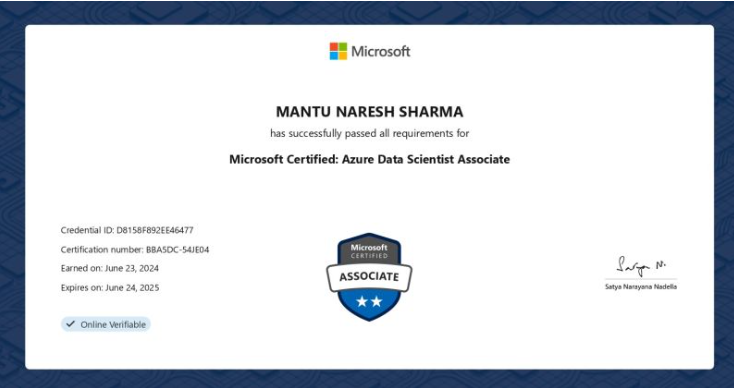
Data Scientist Certification
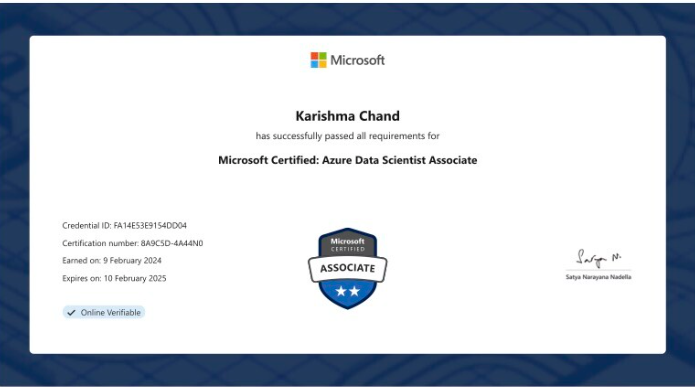
Data Scientist
EXCELLENTTrustindex verifies that the original source of the review is Google. I am completed with python with data analytics course in IIE It's for good teaching best experience for placement training so I will like for Indra institute of education in Gandhipuram branch.Posted onTrustindex verifies that the original source of the review is Google. I have completed the data analytics course . The mentor was friendly to approach and they taught us all the concepts well and it was useful.Posted onTrustindex verifies that the original source of the review is Google. GoodPosted onTrustindex verifies that the original source of the review is Google. great place to study ccna ..sindhu mam really helped me a lot to finish my ccna coursePosted onTrustindex verifies that the original source of the review is Google. Successfully completed in networking and cloud course.thanks to iie teamsPosted onTrustindex verifies that the original source of the review is Google. Best institute in coimbatorePosted onTrustindex verifies that the original source of the review is Google. Best training institute in coimbatorePosted onTrustindex verifies that the original source of the review is Google. Best place to learn Data science and Machine Learning..Thanks IIE teamPosted onTrustindex verifies that the original source of the review is Google. Best place to learn data science in Coimbatore..Thanks IIE teamPosted onTrustindex verifies that the original source of the review is Google. I'm the student of indra institution in coimbatore. Here, to gave a well traning and good teaching of all students. Now , I'm placement to company. Thank you all
Get 15% OFF On This Course Now!

What programming languages should I learn for Data Science?
Python and R are the most popular languages, along with SQL for database querying.
What tools do Data Scientists commonly use?
Common tools include Jupyter Notebooks, Tableau, Power BI, Hadoop, Spark, and machine learning libraries like Scikit-learn and TensorFlow.
What skills are essential for a Data Scientist?
Key skills include Python/R programming, SQL, machine learning, statistics, data visualization, and strong problem-solving abilities.
How is Data Science different from Data Analytics?
Data Science focuses on creating predictive models and algorithms, while Data Analytics emphasizes interpreting historical data to find trends and insights.
Lets find your Perfect online courses today!
Empower Yourself with Expert-Lead Learning Anytime, Anywhere


